Fire Flames Overlays: Add Heat to Your Designs
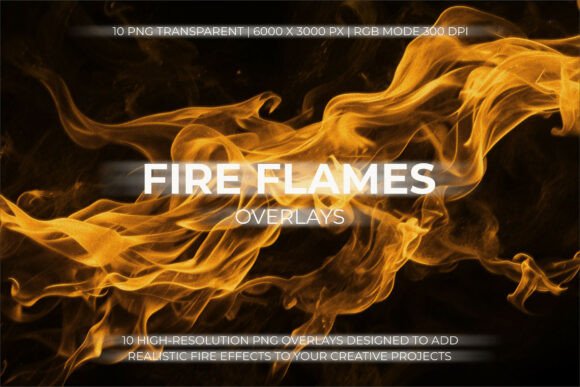
Fire Flames Overlays offer a dynamic way to enhance visual storytelling and design aesthetics. These high-resolution PNG files come with transparent backgrounds, making them ideal for blending into various projects. With realistic flame shapes, glowing embers, and high-contrast details, they bring a sense of energy and intensity that can elevate any creative work.
Whether you're working on posters, gaming artwork, or social media graphics, Fire Flames Overlays provide a versatile tool for designers looking to add dramatic flair. Their compatibility with major design software like Photoshop, Canva, and Illustrator ensures they fit seamlessly into your workflow. The 6000 × 3000 px resolution at 300 DPI guarantees clarity and sharpness, even when scaled up for large formats.
What Makes Fire Flames Overlays Unique?
Unlike generic fire images, these overlays are crafted with attention to detail. Each flame shape is designed to mimic real-world movement and texture, giving your designs a more authentic look. The dynamic motion flow and glowing embers add depth, making the flames appear more lifelike and engaging.
The transparent background allows for easy integration without the need for complex masking. This feature is especially useful when combining overlays with photographs, illustrations, or other design elements. The result is a cohesive and visually striking composition that captures attention.
Creative Possibilities with Fire Flames Overlays
Designers can use Fire Flames Overlays in a variety of ways. For instance, in gaming artwork, they can create intense action scenes or highlight key moments in a game’s narrative. In music covers, they can add a fiery edge that reflects the energy of the track. Social media graphics benefit from the bold visuals, helping posts stand out in crowded feeds.
For branding, these overlays can be used to emphasize a company's energy or innovation. A tech startup might use them to convey a sense of forward momentum, while a fitness brand could use them to symbolize strength and power. The adaptability of the overlays makes them suitable for different industries and styles.
Practical Applications and Project Ideas
One practical approach is to use Fire Flames Overlays as a background element in posters or banners. By applying the Screen or Lighten blending modes, you can achieve a subtle yet impactful effect that enhances the overall design. This technique works well for event promotions, movie posters, or product launches.
Another idea is to incorporate the overlays into photo manipulations. Whether it's adding a fiery glow to a portrait or creating a dramatic scene around an image, the overlays offer a quick and effective way to transform ordinary photos into something extraordinary. Experimenting with different blending modes and layer adjustments can lead to unique results.
Adapting Fire Flames Overlays for Different Goals
Users can tailor Fire Flames Overlays to suit their specific needs. For example, marketers might use them to create eye-catching advertisements that grab attention and convey excitement. Bloggers and content creators can use the overlays to make their visuals more engaging and shareable on platforms like Instagram or Pinterest.
Entrepreneurs and small business owners can leverage these overlays to enhance their branding materials. A restaurant might use a fiery overlay on its menu design to reflect the heat of its dishes, while a fashion brand could use it to highlight a collection inspired by fire or energy. The key is to align the overlay's style with the project's message and audience.
Best Practices for Using Fire Flames Overlays
To get the most out of Fire Flames Overlays, consider the following tips. First, choose the right blending mode based on the desired effect. The Screen mode works well for subtle glows, while the Lighten mode can add more contrast and brightness. Experimenting with opacity levels can help achieve the perfect balance between visibility and subtlety.
When using the overlays in a design, ensure they complement the existing elements rather than overpower them. A good rule of thumb is to use them as accents rather than the main focus. This approach keeps the design clean and professional while still adding a touch of drama and energy.
Realistic Examples and Recommendations
For a cinematic feel, try placing a fire overlay behind a character in a digital illustration. Adjust the size and position to create a natural lighting effect that adds depth and realism. In a poster design, use the overlay to highlight a central image or text, drawing the viewer's eye toward the focal point.
When working on social media graphics, consider using the overlays in combination with bold typography. A fire-themed post about a new product launch can capture attention and generate interest. Similarly, a travel blog might use a fiery overlay to represent the excitement of a destination known for its vibrant culture or nightlife.
Conclusion: Elevate Your Visuals with Fire Flames Overlays
Fire Flames Overlays are more than just decorative elements—they are powerful tools that can transform your designs. With their realistic details, high resolution, and compatibility across design software, they offer a practical solution for adding energy and visual impact to any project. Whether you're a professional designer or a hobbyist, these overlays provide endless opportunities for creativity and expression.
By understanding how to use them effectively, you can enhance your work and make it stand out in a competitive visual landscape. Explore different applications, experiment with blending modes, and let your imagination guide you. Fire Flames Overlays are not just a trend—they are a valuable addition to any designer's toolkit.